Shortlist
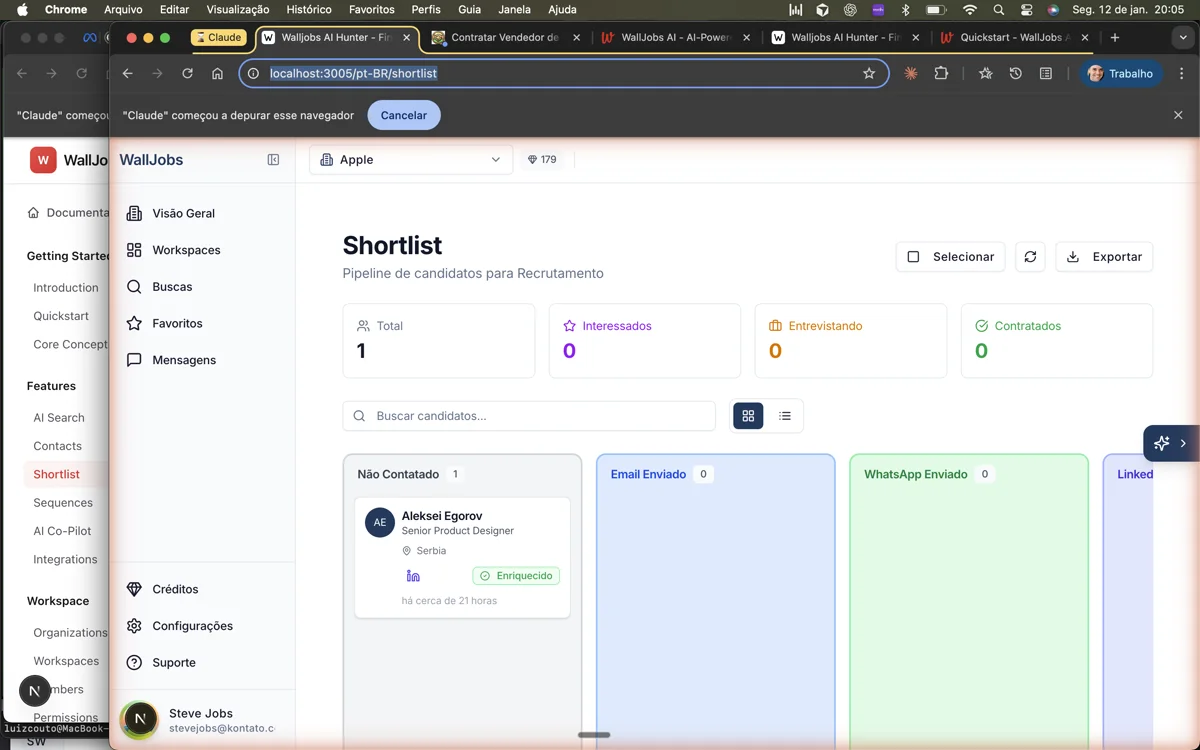
Organize candidates in a visual Kanban board. Create custom pipeline stages and track progress through your hiring workflow.
Overview
The Shortlist feature provides a visual Kanban board for managing your candidate pipeline. Create shortlists for different positions, organize candidates through custom stages, and track progress from first contact to hire.
Key features include:
- Drag-and-drop Kanban boards for intuitive pipeline management
- Customizable pipeline stages to match your hiring workflow
- Quick actions for common operations (email, schedule, reject)
- Filtering and sorting options to focus on priority candidates
- Team collaboration with comments and mentions
Creating Shortlists
Create a shortlist for each open position or hiring initiative:
- Navigate to Shortlist in the sidebar
- Click New Shortlist
- Enter a name (e.g., "Senior Frontend Developer - Q1 2024")
- Optionally add a description with job details
- Choose a pipeline template or create custom stages
- Click Create
Pipeline Stages
Each shortlist has customizable pipeline stages. Default stages include:
- -
- -
- -
- -
- -
- -
Customize stages to match your workflow:
- Open a shortlist
- Click Settings (gear icon)
- Add, rename, reorder, or remove stages
- Set stage colors for visual distinction
- Configure automation triggers (optional)
Adding Candidates
Add candidates to a shortlist from multiple places:
- From Search Results - Click "Add to Shortlist" on any candidate card in search results.
- From Contact Profile - Open a contact and click "Add to Shortlist" in the actions menu.
- Bulk Add - Select multiple contacts and add them to a shortlist in one action.
- Within Shortlist - Click "Add Candidate" in the board view and search for existing contacts.
Managing the Pipeline
The Kanban board provides several ways to manage candidates:
- -
- -
- -
- -
- -
Team Collaboration
Work together with your team on candidate evaluation:
- Comments - Leave comments on candidate cards. Use @mentions to notify specific team members.
- Ownership - Assign candidates to team members. The owner is responsible for moving the candidate through the pipeline.
- Activity Feed - See all recent activity across the shortlist, including stage changes, comments, and notes.
- Notifications - Get notified when you're mentioned or when candidates in your ownership change status.
Archiving & Cleanup
Keep your shortlists organized by archiving completed ones:
- Archive Shortlist - Archive a shortlist when the position is filled. Archived shortlists can still be viewed but don't appear in the main list.
- Remove Candidates - Remove candidates from a shortlist without deleting them from your contacts. They remain in your database for future opportunities.
- Bulk Actions - Move or remove multiple candidates at once to quickly clean up your pipeline.